Auto marking-scheme detection
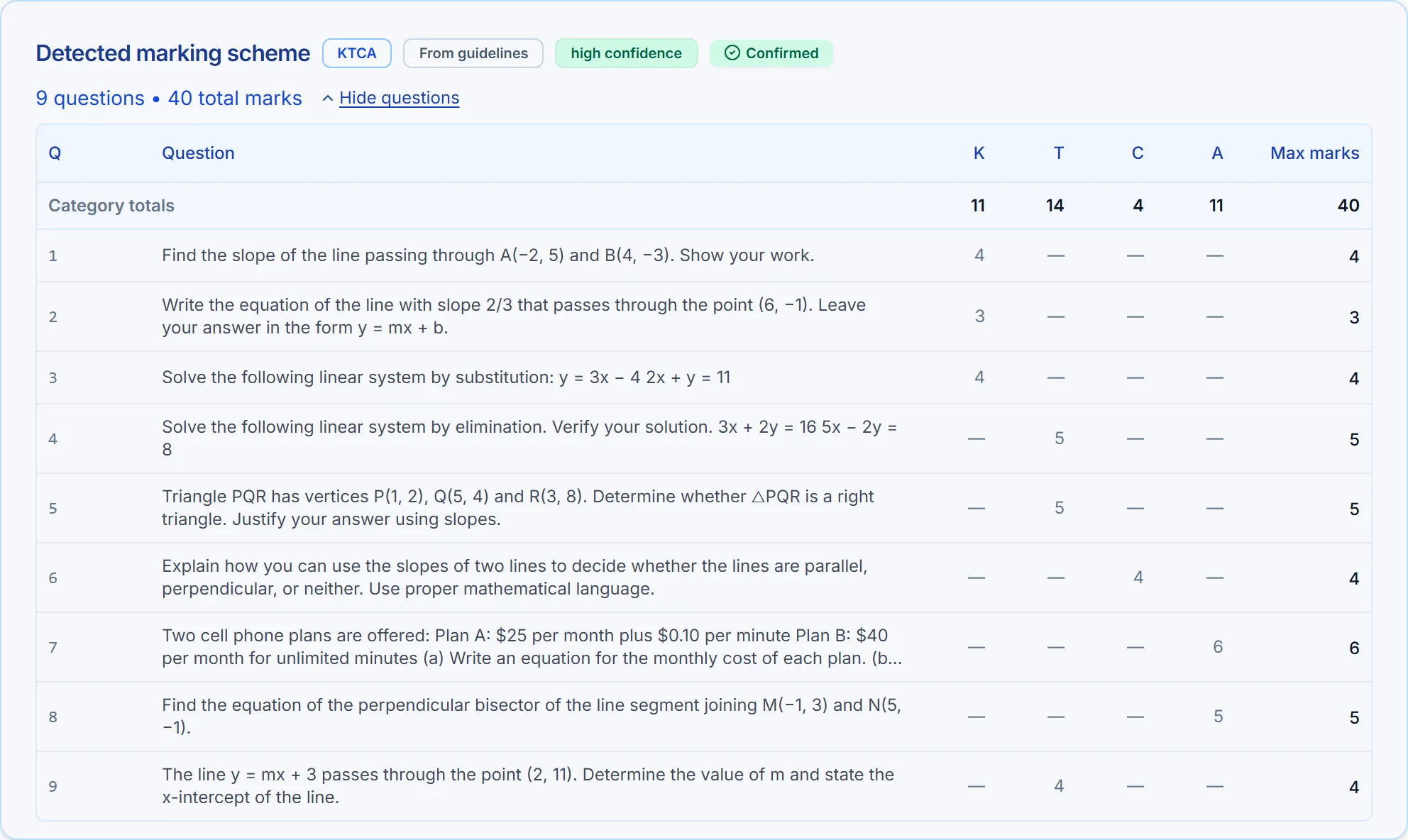
Drop in a quiz, test or assignment and the system infers the scheme — the questions, the marks, and any achievement categories your rubric uses — for you to review and confirm before a single mark is given.
Upload a class set. The AI reads your assessment, works out how it is marked, then grades every question against your scheme — points, rubric levels or achievement categories — pinning each comment to the exact spot on the page it came from. You review, adjust, export.
3-day free trial · 8 grading credits · your own branded subdomain. Any course, any curriculum. Cancel anytime.
Name any course you teach — the marking scheme comes from your assessment, not from a fixed curriculum list
The AI marks each question, writes the reason, and pins it to the line on the page it came from. You drag anything you disagree with — and it all bakes into the PDF the student gets back.
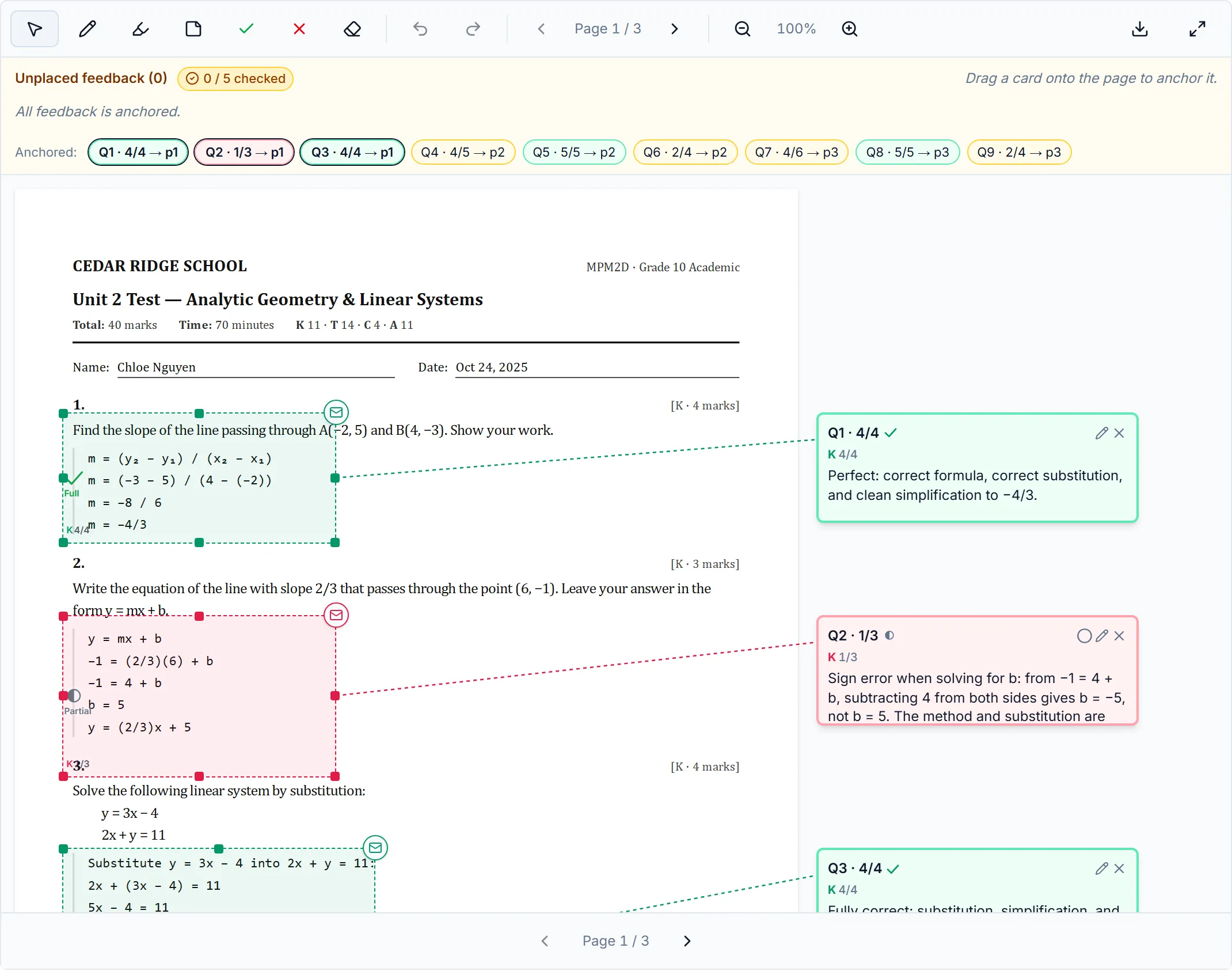
No setup calls, no training. If you can upload a PDF, you can grade a class.
Create your school, pick your plan (monthly or annual), and you're in — your own branded subdomain and a 3-day trial.
Name the course — anything you teach — then drop in student PDFs, typed or scanned.
AI detects the scheme automatically. You review the questions, the marks and any category split, then confirm.
Our AI grades every submission per question, flags anything uncertain, and tallies class-level stats.
Check the annotated PDFs, clear the review queue, and export the whole class as a ZIP of graded PDFs.
Upload, detect the scheme, grade with reasons, review, export. Here's the short version.
Upload the assessment and its scheme and the questions, marks and K/T/C/A split come back filled in. Every number is editable, the category totals recompute as you type, and if K+T+C+A doesn't match a question's total it says so — with a one-click fix. Nothing is graded until you confirm.
The scheme is detected, then you confirm it — before any marks are given.
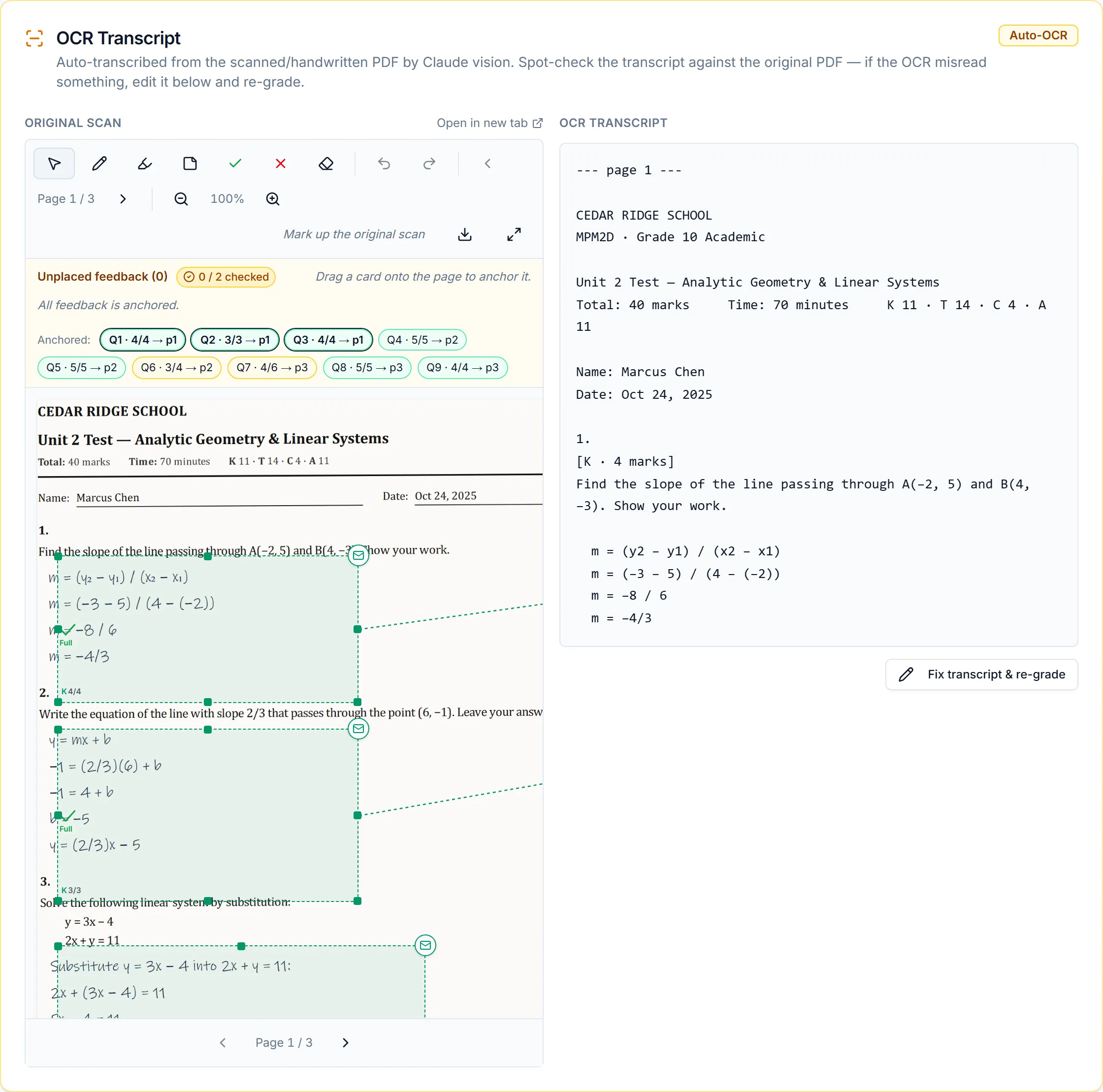
Photograph or scan a paper test and it's read by vision AI. The transcript sits beside the original so you can spot-check it, and if something was misread you fix the text and re-grade — with no second scan.
Handwriting is transcribed — and you can fix the transcript before it's graded.
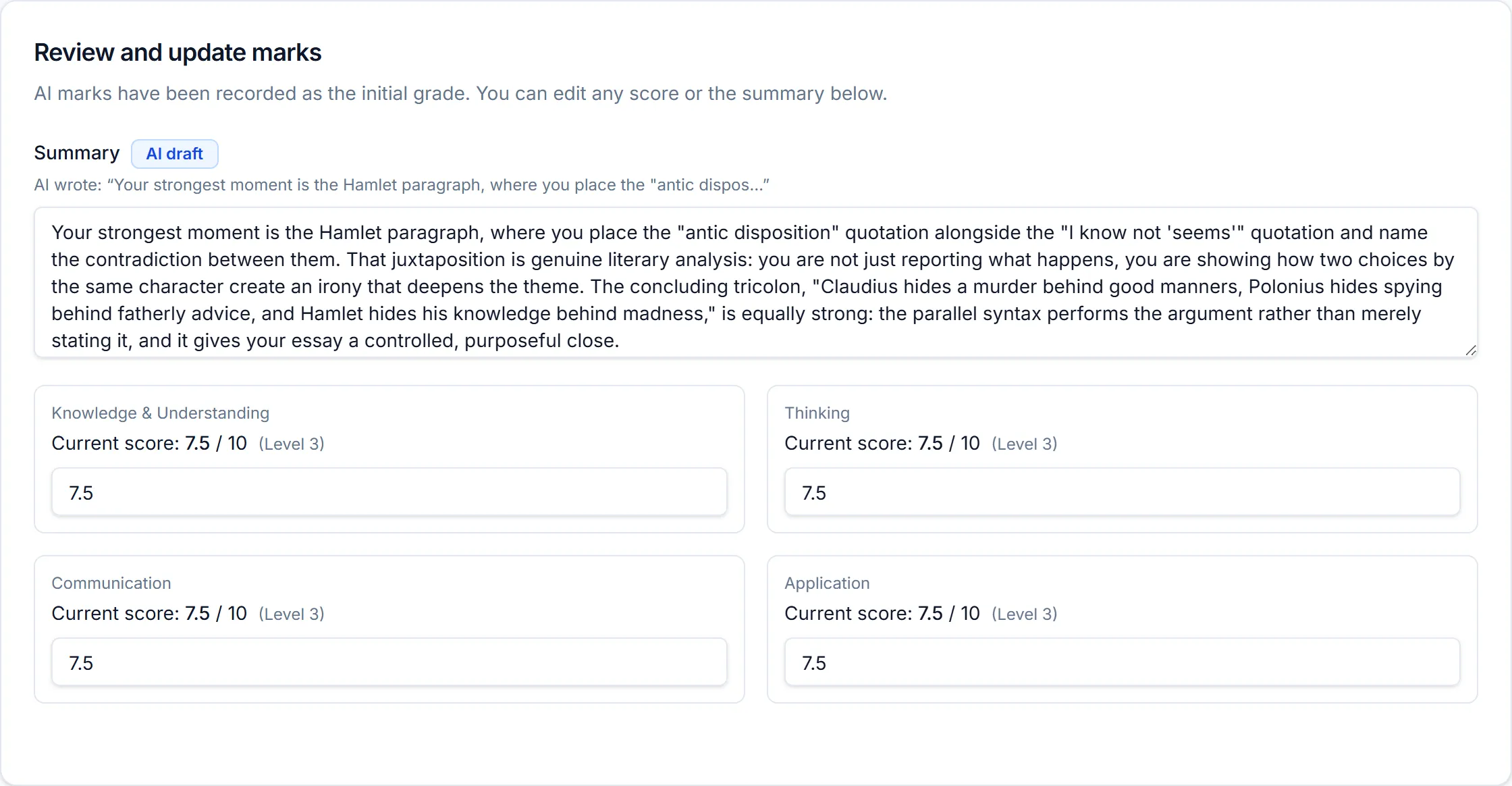
On Pro and up, essays are graded against the rubric from your own assignment. Each of Knowledge, Thinking, Communication and Application gets a mark and an achievement level, with the reasoning quoted from the student's own writing. Every mark is editable.
Essays are marked criterion by criterion against your rubric (this sample uses Ontario's K/T/C/A), with the AI's reasoning quoted from the student's own writing. Every mark is editable.
Mean, median and the mark distribution across the class set. Anything the model was unsure about — or that lands far from the class mean — is flagged into a review queue with the reason attached.
The shape of the whole class, the moment grading finishes.

AI does the first pass; you stay in control of every mark that goes back to a student.
Drop in a quiz, test or assignment and the system infers the scheme — the questions, the marks, and any achievement categories your rubric uses — for you to review and confirm before a single mark is given.
The AI grades every submission question-by-question with written justification, so a teacher can see exactly why each mark was awarded.
Before any expensive grading run, a lightweight pre-check verifies the submission actually contains the questions and mark allocations. Confirmed marking schemes are remembered per assessment — upload once, never pay to detect that assessment again.
Anything the model is unsure about is flagged into a queue, with the reason it was unsure. Clear it, and it disappears — nothing slips through unseen.
Change a mark or rewrite a comment and it's tagged “Edited by teacher”. The original AI output is kept — one click reverts it.
Sign up and your school gets its own subdomain, logo and colours in under five seconds — your teachers see your brand, not ours.
Three moments from every grading run — the scheme check, the marking pass, and your class results. You review everything before it goes home.
Illustrated — see the real screens above.
No per-page maths. Pick a plan — monthly or annual — start with a free trial, and scale when your class sets grow.
For a single teacher or a small tutoring room.
Billed annually · $228/yr · or $24/mo monthly
Billed monthly · cancel anytime
50 graded submissions / month
Start free trialFor a busy department that also grades essays.
Billed annually · $588/yr · or $59/mo monthly
Billed monthly · cancel anytime
125 graded submissions / month
Start free trialFor a whole school or multi-campus centre.
Billed annually · $2,388/yr · or $249/mo monthly
Billed monthly · cancel anytime
500 graded submissions / month
Talk to us / start trialAll prices in CAD — save up to 21% with annual billing. Every school is billed independently. Compare all features →
Everything else on this page ships today. These two don’t, so they don’t get a checkmark in the pricing table.
A deterministic, audit-traced calculator for schools whose final mark includes an attendance component (such as Ontario's 15%). Designed, not yet built.
Push graded results straight into Moodle. The core flow is deliberately LMS-free and always will be — this is for schools that want it.
The things teachers and centre directors ask us first.
One credit grades one submission. A grading run for a class of 28 uses 28 credits; re-grading a student later uses one more. It's the simplest possible unit — no per-page or per-question maths to track.
Every plan starts with a 3-day free trial that includes 8 grading credits — enough to grade a small class set. Cancel anytime from your billing page.
Grading pauses — uploading work and reviewing already-graded submissions are never blocked. Buy a credit top-up right in the app (from $15 for 25 credits — top-ups never expire) or upgrade your plan. Monthly credits reset each billing period and don't roll over.
Yes. Top-up packs — 25 credits for $15, 100 for $55 or 250 for $125 — are one-time purchases from your Billing page. They never expire, and they're only drawn on after your monthly allotment is used up.
Yes. Switch tiers, move between monthly and annual billing, update your payment method or cancel — all self-serve from your billing page. Changes prorate automatically.
Yes. Each school gets its own branded subdomain and isolated environment, with its own billing. Beyond the School tier's 500 credits a month, or several campuses under one agreement, talk to us about Enterprise — hello@gradingmate.com.
Yes — scanned pages are read with vision OCR, and you can correct the transcript before it's graded if anything was misread. Because scans cost more to process, there's a sensible per-assessment page limit on the trial and entry tier so a single huge upload can't run away with your credits.
Any of them. You name the course yourself — there is no fixed catalogue to pick from — and the grader works from the assessment and marking scheme you upload rather than from a curriculum it was told about in advance. It has been exercised across maths, the sciences, English, humanities, business, computer science and languages, at every secondary grade.
No — and you never will. The whole flow (upload, grade, review, export) is LMS-free by design. A Moodle connector is on our roadmap for schools that want one, but it isn't built yet and the core product doesn't depend on it.
Yes — they're captured straight from the app, and every mark, comment and confidence flag in them was produced by the real grader. The class is invented: publishing a real student's work would be a privacy breach, so we wrote our own sample assessment and papers and graded those.
Still weighing it up? Email hello@gradingmate.com — a real person answers.
Create your school, pick your plan — monthly or annual — and put AI grading to work on a real assignment before your coffee gets cold.
3-day free trial · 8 grading credits · cancel anytime from your billing page